

Virtual Remote Tool
Version : Ver.1.57:32-bit OS / Ver.2.44:64-bit OS
Overview
This is software for operating a projector connected by LAN (wired or wireless), serial connections (RS-232C) or computer connection cable (signal cable) from the computer.
The following projector operations are possible from the personal computer:
- Power on / off
- Input signal switching
- Muting (temporarily disabling audio / video)
- Freezing (locking the projected image)
- Operating Remote Control
- The logo image transmission
[Note]
Logo image transmission and computer cable connection are not possible depending on the projector types.
Use the supplied VGA signal cable for your projector. This function may not work depending on the specifications of your connected computer or your graphics adaptor and the version of your driver.
If you're using some projectors, the remote control button names in this software might not match the input terminal names on each unit.
Correction point to Ver.1.57 / Ver.2.44
Ver.1.56 / Ver.2.43 → Ver.1.57 / Ver.2.44
- Fixed a problem with the operation when selecting the remote control skin button.
Operating Environment
Virtual Remote Tool can be used with the following OS and projectors.
Supported Projector (MODEL NO.)
- NP3250 / NP2250 / NP1250 / NP3250W
- NP3200 / NP2200 / NP1200 / NP3201 / NP2201
- NP3151W / NP3150 / NP2150 / NP1150
- NP905 / NP901W
- NP630 / NP530 / NP430 / NP420
- NP610 / NP510 / NP510W / NP410 / NP410W / NP310 / NP405 / NP305 / NP610S / NP510WS
- NP600 / NP600S / NP500 / NP500W / NP500WS / NP400 / NP300
- NP216 / NP215
- NP-M350X / NP-M300X / NP-M260X / NP-M230X / NP-M300W / NP-M260W
- NP-M350XS / NP-M300XS / NP-M260XS / NP-M300WS / NP-M260WS
- NP-M353HS / NP-M323HS / NP-M303HS
- NP-M361X / NP-M311X / NP-M271X / NP-M311W / NP-M271W
- NP-M402W / NP-M362W / NP-M402X / NP-M362X / NP-M322X / NP-M282X / NP-M322W / NP-M352WS / NP-M302WS / NP-M332XS / NP-M402H / NP-M322H
- NP-M403W / NP-M363W / NP-M323W / NP-M403X / NP-M363X / NP-M323X / NP-M283X / NP-M353WS / NP-M303WS / NP-M333XS / NP-M403H / NP-M323H
- NP-M420X / NP-M420XV
- NP-MC382W / NP-MC332W / NP-MC422X / NP-MC372X / NP-MC342X / NP-MC302X
- NP-ME360X / NP-ME310X / NP-ME270X
- NP-ME382U / NP-ME342U / NP-ME372W / NP-ME402X
- NP-ME401W / NP-ME361W / NP-ME331W / NP-ME301W / NP-ME401X / NP-ME361X / NP-ME331X / NP-ME301X
- NP-P420X / NP-P350X / NP-P350W
- NP-P501X / NP-P451X / NP-P451W / NP-P401W / NP-PE501X
- NP-P502H / NP-P502W / NP-P452H / NP-P452W
- NP-P502HL / NP-P502WL
- NP-P554U / NP-P474U / NP-P554W / NP-P474W / NP-P604X / NP-P603X
- NP-P605UL / NP-P525UL / NP-P525WL
- NP-PE401H
- NP-PE455UL / NP-PE455WL / NP-PE505XL
- NP-PA600X / NP-PA500X / NP-PA550W / NP-PA500U
- NP-PA622U / NP-PA522U / NP-PA672W / NP-PA572W / NP-PA722X / NP-PA622X / NP-PA621U / NP-PA521U / NP-PA671W / NP-PA571W / NP-PA721X / NP-PA621X
- NP-PA803U / NP-PA723U / NP-PA653U / NP-PA853W / NP-PA703W / NP-PA903X
- NP-PA803UL / NP-PA703UL / NP-PA653UL
- NP-PA804UL / NP-1004UL
- NP-PH1000U
- NP-PH1202HL / NP-PH1002HL
- NP-PH1400U / NP-PH1200U
- NP-PH3501QL / NP-PH2601QL
- NP-PX602UL-WH / NP-PX602UL-BK / NP-PX602WL-WH / NP-PX602WL-BK
- NP-PX750U / NP-PX700W / NP-PX800X
- NP-PX803UL-WH / NP-PX803UL-BK
- NP-PX1004UL-WH / NP-PX1004UL-BK
- NP-PX1005QL
- NP-U300X / NP-U250X / NP-U310W / NP-U260W
- NP-U321H
- NP-UM330X / NP-UM280X / NP-UM330W / NP-UM280W
- NP-UM351W / NP-UM301W / NP-UM361X / NP-UM301X
- NP-UM352W
- NP-V300X / NP-V260X / NP-V230X / NP-V260 / NP-V230 / NP-V260R / NP-V300W / NP-V260W
- NP-V311W / NP-V281W / NP-V311X
- NP-V332W / NP-V332X / NP-V302W / NP-V302X / NP-V302H
- NP-VE282X / NP-VE281X / NP-VE280X / NP-VE282 / NP-VE281 / NP-VE280
- NP-VE303X / NP-VE303
- VT800
- NP-P627UL / NP-P547UL
- NP-PV710UL+
- NP-PV800UL / NP-PV730UL / NP-PV710UL
- NP-PA1505UL / NP-PA1705UL
Supported Function
| Model name | LAN connection | Serial connection |
The computer cable connection | USB connection | The logo image transmission |
|---|---|---|---|---|---|
| NP3250/NP2250/ NP1250/NP3250W |
○ | ○ | - | - | ○*1 |
| NP3200/NP2200/ NP1200/NP3201/ NP2201 |
○ | ○ | ○ | - | - |
| NP3150/NP2150/ NP1150/NP3151W/ NP905/NP901W/VT800 |
○ | ○ | - | - | ○*1 |
| NP630/NP530/NP610/ NP510/NP510W/NP410/ NP410W/NP310/NP610S/ NP510WS |
○ | ○ | ○ | - | - |
| NP430/NP420/ NP405/NP305 |
- | ○ | ○ | - | - |
| NP600/NP600S/ NP500/NP500W/ NP500WS/NP400/ NP300 |
○ | ○ | ○ | - | - |
| NP216/NP215 | ○ | ○ | - | - | - |
| NP-M420X/NP-M420XV/ NP-M350X/NP-M300X/ NP-M260X/NP-M230X/ NP-M300W/NP-M260W/ NP-M350XS/NP-M300XS/ NP-M260XS/NP-M300WS/ NP-M260WS |
○ | ○ | ○ | - | ○*2 |
| NP-M353HS/NP-M323HS/ NP-M303HS |
○ | ○ | ○ | - | ○*7 |
| NP-M361X/NP-M311X/ NP-M271X/NP-M311W/ NP-M271W |
○ | ○ | ○ | - | ○*4 |
| NP-M402W/NP-M362W/ NP-M402X/NP-M362X/ NP-M322X/NP-M282X/ NP-M322W/NP-M352WS/ NP-M302WS/NP-M332XS/ NP-M402H/NP-M322H |
○ | ○ | ○ | - | - |
| NP-M403W/NP-M363W/ NP-M323W/NP-M403X/ NP-M363X/NP-M323X/ NP-M283X/NP-M353WS/ NP-M303WS/NP-M333XS/ NP-M403H/NP-M323H |
○ | ○ | ○ | - | ○*6 |
| NP-MC382W/NP-MC332W/ NP-MC422X/NP-MC372X/ NP-MC342X/NP-MC302X |
○ | ○ | ○ | - | ○*9 |
| NP-ME360X/ NP-ME310X/NP-ME270X |
- | ○ | ○ | - | - |
| NP-ME382U/NP-ME342U/ NP-ME372W/NP-ME402X |
○ | ○ | ○ | - | ○*9 |
| NP-ME401W/NP-ME361W/ NP-ME331W/ NP-ME301W/ NP-ME401X/NP-ME361X/ NP-ME331X/NP-ME301X |
○ | ○ | ○ | - | ○*4 |
| NP-P420X/NP-P350X/ NP-P350W |
○ | ○ | ○ | - | ○*2 |
| NP-P501X/NP-P451X/ NP-P451W/NP-P401W |
○ | ○ | ○ | - | ○*4 |
| NP-P502H/NP-P502W/ NP-P452H/NP-P452W |
○ | ○ | ○ | - | ○*6 |
| NP-P502HL/NP-P502WL | ○ | ○ | ○ | - | ○*6 |
| NP-P554U/NP-P474U/ NP-P554W/NP-P474W/ NP-P604X/NP-P603X |
○ | ○ | ○ | - | ○*4 |
| NP-P605UL/NP-P525UL/ NP-P525WL |
○ | ○ | ○ | - | ○*9 |
| NP-PE401H | ○ | ○ | ○ | - | - |
| NP-PE455UL/NP-PE455WL/ NP-PE505XL |
○ | ○ | ○ | - | ○*9 |
| NP-PE501X | - | ○ | ○ | - | ○*4 |
| NP-PA600X/NP-PA500X/ NP-PA550W/NP-PA500U |
○ | ○ | - | - | ○*3 |
| NP-PA622U/NP-PA522U/ NP-PA672W/NP-PA572W/ NP-PA722X/NP-PA622X/ NP-PA621U/NP-PA521U/ NP-PA671W/NP-PA571W/ NP-PA721X/NP-PA621X |
○ | ○ | - | - | ○*5 |
| NP-PA803UL/NP-PA703UL/ NP-PA653UL |
○ | ○ | - | - | ○*5 |
| NP-PA804UL / NP-PA1004UL | ○ | ○ | - | - | ○*5 |
| NP-PA803U/NP-PA723U/ NP-PA653U/NP-PA853W/ NP-PA703W/NP-PA903X |
○ | ○ | - | - | ○*5 |
| NP-PH1000U | ○ | ○ | - | - | ○*3 |
| NP-PH1202HL/ NP-PH1002HL |
○ | ○ | - | - | ○*5 |
| NP-PH1400U/ NP-PH1200U |
○ | ○ | - | - | ○*3 |
| NP-PH3501QL/ NP-PH2601QL |
○ | ○ | - | - | ○*8 |
| NP-PX602UL-WH/ NP-PX602UL-BK/ NP-PX602WL-WH/ NP-PX602WL-BK |
○ | ○ | - | - | ○*5 |
| NP-PX750U/NP-PX700W/ NP-PX800X |
○ | ○ | - | - | ○*3 |
| NP-PX803UL-WH/ NP-PX803UL-BK |
○ | ○ | - | - | ○*5 |
| NP-PX1004UL-WH/ NP-PX1004UL-BK |
○ | ○ | - | - | ○*5 |
| NP-PX1005QL | ○ | ○ | - | - | ○*8 |
| NP-U300X/NP-U250X/ NP-U310W/NP-U260W |
○ | ○ | ○ | - | - |
| NP-U321H | ○ | ○ | - | - | - |
| NP-UM330X/NP-UM280X/ NP-UM330W/NP-UM280W |
○ | ○ | ○ | - | ○*4 |
| NP-UM351W/NP-UM301W/ NP-UM361X/NP-UM301X |
○ | ○ | ○ | - | ○*4 |
| NP-UM352W | ○ | ○ | ○ | - | ○*4 |
| NP-V300X/NP-V260X/ NP-V300W/NP-V260W |
○ | ○ | ○ | - | - |
| NP-V230X/NP-V260/ NP-V230/NP-V260R |
- | ○ | ○ | - | - |
| NP-V311W/NP-V281W/ NP-V311X |
○ | ○ | ○ | - | - |
| NP-V332W/NP-V332X/ NP-V302W/NP-V302X/ NP-V302H |
○ | ○ | - | - | - |
| NP-VE282X/NP-VE282 | - | - | ○ | ○ | - |
| NP-VE281X/NP-VE280X/ NP-VE281/NP-VE280 |
- | ○ | ○ | - | - |
| NP-VE303X/NP-VE303 | - | ○ | ○ | - | - |
| NP-P627UL / NP-P547UL | ○ | ○ | - | - | ○*5 |
| NP-PV710UL+ | ○ | ○ | - | - | ○*5 |
| NP-PV800UL / NP-PV730UL / NP-PV710UL |
○ | ○ | - | - | ○*5 |
| NP-PA1505UL / NP-PA1705UL | ○ | ○ | - | - | ○*5 |
- *1
- File size: 256 KB or less
- Image size (resolution): the native resolution of the projector - *2
- File size: 64 KB or less
- Image size (resolution): Horizontal 699 dots x vertical 499 dots or less
- Number of colors: 256 colors or less - *3
- File size: 256 KB or less
- Image size (resolution): the native resolution of the projector
- File format : JPEG - *4
- File size: Less than 1 MB
- Image size (resolution): the native resolution of the projector
- Number of colors: 256 colors or less
- *5
- File size: 256 KB or less
- Image size (resolution): the native resolution of the projector
- File format : PNG(full color) - *6
- File size: 768 KB or less
- Image size (resolution): the native resolution of the projector
- Only via serial connection
- *7
- File size: 768 KB or less
- Image size (resolution): the native resolution of the projector
- Only via serial connection
- FIRMWARE version 1.01 or later - *8
- File size: 512 KB or less
- Image size (resolution): the native resolution of the projector
- File format : PNG(full color) - *9
- File size: 1 MB or less
- Image size (resolution): the native resolution of the projector
- File format : JPEG / PNG
Supported OS
| 32-bit version | 64-bit version |
| Windows XP Home Edition Windows XP Professional Windows Vista Home Basic Windows Vista Home Premium Windows Vista Business Windows Vista Enterprise Windows Vista Ultimate Windows7 Home Basic Windows7 Home Premium Windows7 Professional Windows7 Enterprise Windows7 Ultimate Windows 8 Windows 8 Pro Windows 8 Enterprise Windows 8.1 Windows 8.1 Pro Windows 8.1 Enterprise Windows 10 Home Windows 10 Pro Windows 10 Enterprise Windows 10 Education |
Windows Vista Home Basic Windows Vista Home Premium Windows Vista Business Windows Vista Enterprise Windows Vista Ultimate Windows7 Home Premium Windows7 Professional Windows7 Enterprise Windows7 Ultimate Windows 8 Windows 8 Pro Windows 8 Enterprise Windows 8.1 Windows 8.1 Pro Windows 8.1 Enterprise Windows 10 Home Windows 10 Pro Windows 10 Enterprise Windows 10 Education |
Supported video chip
Download file format
Self-extracting exe file
Installation instruction
When installing / uninstalling software in Windows Vista / Windows 7 / Windows 8 / Windows 8.1 / Windows 10, you must log on as a user with " Administrator " rights.
When installing / uninstalling software in Windows XP, you must log on as a user with " Computer Administrator " rights.
Go to download
Sorry, you cannot download these contents on this page from Cuba, Iran, Korea(North), Syria, Ukraine(Crimean region). These software programs and manuals subject to U.S. Export Administration Regulations. We shall not reexport or release them to the national below, without a license by BIS (a section of U.S. Government).
【Important Notes on operating by Windows XP / Windows 8】
This program requires Microsoft .NET Framework 2.0.
Download the .NET Framework 2.0, 3.0 or 3.5 and install the software from the Microsoft website, or other sources.
The installation of Microsoft.NET Framework 2.0, requires the following softwares.
- Windows Installer 3.0 or later
- Internet Explorer 5.01 or later
Please refer to Microsoft-related websites for more information.
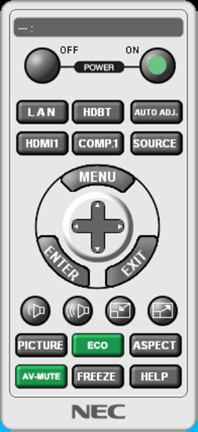
Changed video input button of Remote Control Skin to digital input terminal.(Ver.1.55/2.42 or later)
Ver.1.54/2.41
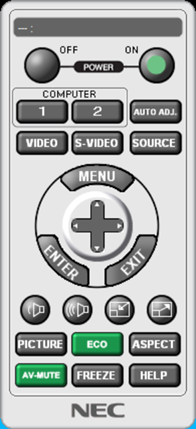
Ver.1.55/2.42 or later
Click the filename from the following list.
| language | file name | file size |
|---|---|---|
| English | Digital input terminal version Virtual Remote Tool (Ver. 1.57:32-bit version) VRT157.exe |
18.5MB |
| English | Digital input terminal version Virtual Remote Tool (Ver. 2.44:64-bit version) VRT244.exe |
19.0MB |
| English | Virtual Remote Tool (Ver. 1.54:32-bit version) VRT154.exe |
18.5MB |
| English | Virtual Remote Tool (Ver. 2.41:64-bit version) VRT241.exe |
19.0MB |